Zoe's Hiking Scavenger Hunt Func Spec!
Getting Started
Make sure you read the topic - Plan it & Design it. It actually tells you what.
- After picking an idea - do the items the Planning box first.
- Then, work your way down the page. Do Home Page Planning after you learn about HTML & CSS.
- Then, after your learn about SQL & Database, design your database.
- Then, after you learn some basic PHP - creating your login/user functionality.
- Finally, you are ready to do the Core Functionality!
Func Spec Examples
Take a look at other's func specs to get ideas. While Hadley's is good - it is very complicated. BTW - none of these are perfect!
- Margot's Ultimate Frisbee App
- Fiona's Skiing
- Eva's Clothes Generator - go down to Solutions Overview section
Step 1: Overall Planning
Scope of the Project
Often times, hiking can get boring for kids because hikes seem like long, difficult walks. This app generates a scavenger hunt for kids to fill out over the course of their adventure. It encourages environmentally friendly practices while making outdoors exploration fun!
Solutions Overview
Scope of the Project
The items are personalized based on where the family is hiking, and there are various point values for each of them. The app would require the user to have an account so that a leaderboard can be made for each park/city.
Core Functionality
Do bullet points here listing what your app will do - maybe group them by area? Take a look at Margot's for ideas.
Home Page
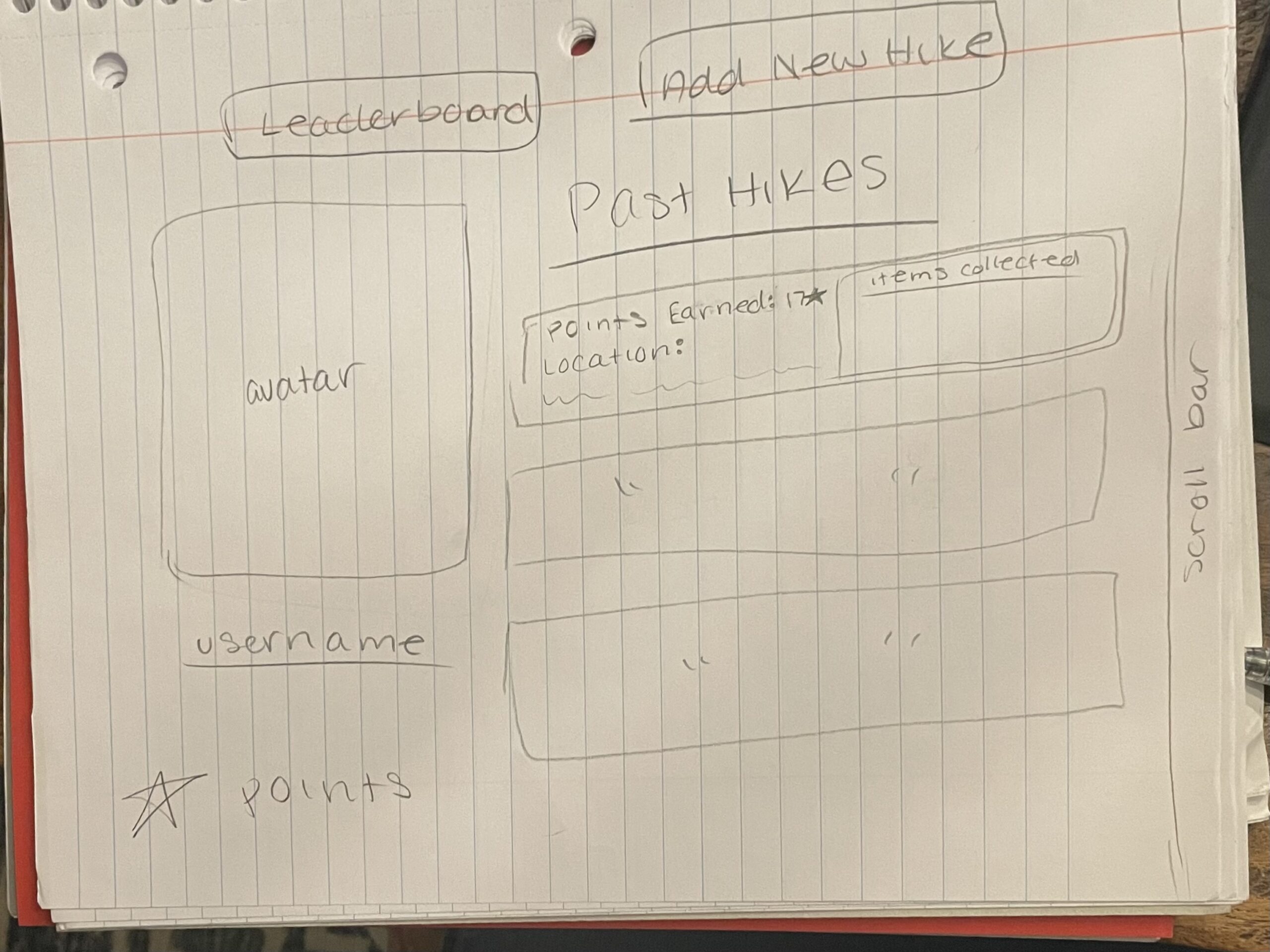
- Once the user logs in, there is a page with their profile that shows past hikes, total points, and other personal info
- There are tabs to view the leaderboard of users or add a hike
New Hike
- The user inputs the park or city that they are hiking in
- The algorithm generates a list of plants and animals and other items to look out for with a place to upload an image
- There is also a space that gives you points for picking up trash you find in the park
- With each item completed, you get a fun fact
- There is a "hike completed" button at the end and you get to see the leaderboard for that specific location
Step 2: Home Page Planning
Wireframe
Plan out what your home page will look like. Create a wireframe - either electronically or via pen and pencil. When you are done put copy of it in the box below!
Step 3: Database Planning
Database Diagram
Figure out the structure of your database - tables and fields. This is very important. Create this using a tool or via Paper. I use Microsoft Access as it is very easy and creates clean layouts.

Step 4: New User & Login Functionality
Plan Your New User/Login Functionality
As described in the course - take a few minutes to read Step 6 and Step 7 - and plan out your own New User/Login functionality. It may exactly mirror the sample - but take some time to think about it and make sure you understand the process.
Also, develop your code intelligently! You will be reusing functions in your core functionality - so use variables - try to make the code work for multiple instances. Less code is easier to maintain and debug.